
Review by George Shilling
Want to sound like Dave Lee Travis? I thought not! However, if you are in the broadcast business you will need to apply some processing to your announcers' or deejays' microphones. There is a whole host of all-in-one vocal processors available, and at the moment there seems to be a new one every month.
The Symetrix 528E has been available for some time: a fairly straightforward processor that leans in the direction of the broadcast market. Now, Symetrix claim this new unit, the uninspiringly named 628, has been developed as a result of requests from 528 users. The problem with the old-fashioned 528 was apparently that you had to adjust the settings for each user. Doh! Now, the new digital 628 gives you 127 preset locations. So as long as you remember which number your preset is, this could be very useful.
The 628 is a 1U, 6.5" deep dark grey box, with a fairly solid feel. On the back are XLRs for Mic and Line level inputs, the latter also having a TRS socket, the former accompanied by a phantom power switch - a daft place for any switch. There are XLRs and unbalanced jack analogue outputs for left and right, which is odd as this is not a stereo unit: both outputs carry the same signal. Next, the digital output section comprises a toggle switch for sample rate, a push-button to select AES/EBU or S/PDIF and the appropriate phono and XLR sockets. There is no digital input. Further along there are MIDI IN and MIDI OUT/THRU, the IN doubling as a seven-pin DIN socket to accept the special lead supplied with the optional RC-1 remote control unit. A screwdriver operated pot selects MIDI channel.
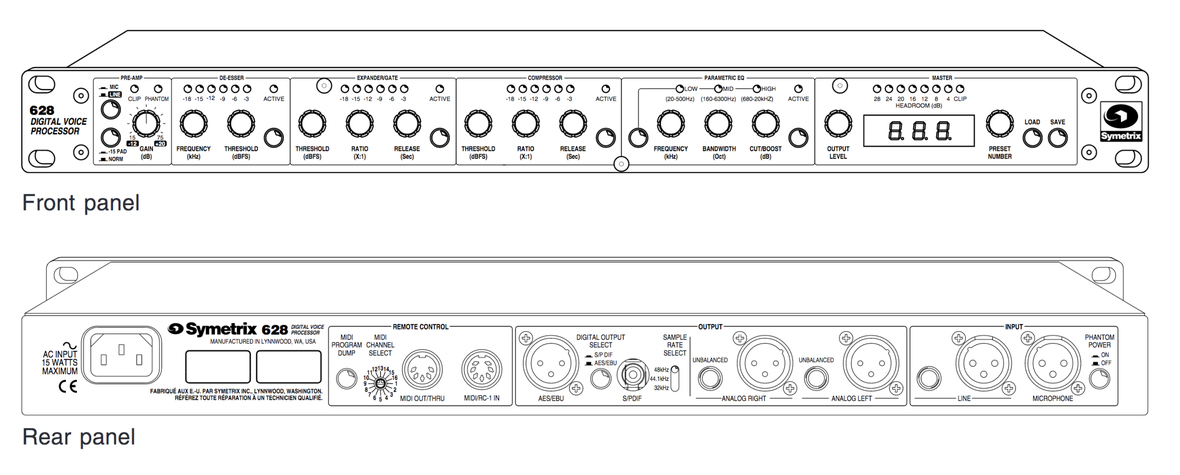
Mains goes in via an IEC socket: the review model came with a useless American lead, but I am sure retail units will have the correct one. On the front panel, from left to right you get: 1. The pre-amp section, featuring the only "real" pot, for input gain (which therefore, irritatingly, does not get saved as part of the preset), and latching switches for Mic/Line input selection and 15dB pad. LEDs indicate Clip and Phantom On. All subsequent pots are data encoders with small but deep rubbery knobs which have a pleasantly damped feel, and about twenty "notches" per full rotation.
One click of any pot displays its current setting on the LED panel on the right of the unit. All subsequent buttons are momentary push switches, and each section features a button and LED to make it Active. 2. The de-esser features frequency and threshold pots and a row of LEDs to indicate gain reduction. It works well, but I found its release to be a little slow. 3. The expander/gate section works very well, featuring threshold, ratio and release knobs and a row of LEDs to indicate gain reduction. 4. The compressor section features identically labelled controls to the gate section, so be careful there, people! Attack is preset pretty fast, but not fast enough to stop explosive transients such as 'T's. Each of the preceding three sections seem to have an odd set of numbers for the threshold setting. This is because it is referenced to digital zero (dBfs). 5. The three band EQ shares one set of knobs for Frequency, Bandwidth and Cut/Boost, with overlapping bands and LEDs to show which band you are editing. 6. The Master section features an Output Level pot, an Output Level meter, a preset number pot and Load and Save buttons, and a simple three-figure LED display.
The input stage feeds a 20 bit A/D converter, then a 24 bit Motorola digital signal processor handles the signal dynamics. Because there is no Input meter, the manual suggests bypassing all the sections, setting the Output gain to zero, then using the Output LEDs to set input gain. A bit of a palaver really, and to get unity with Output set at zero the input pot has to be down at about 10 o'clock which does not feel right. Presets 120 to 127 are set up with some examples for different styles of radio announcer. You cannot overwrite these, but you can resave any tweaks to any of the other 119 stores, which all start off "blank". The lack of layered menus is admirable in a digital unit, and I found it very simple to use. It can, however, take many rotations to twiddle through some of the scales, for example from the bottom to the top of an EQ frequency range. Perhaps some of the scales are a little too fine, or maybe Symetrix should have employed an accelerator mode. You could then whizz through the scale when the knobs are turned faster (like the clock on my electric cooker!) The manual is good-humoured in an American way, and although not that logically ordered, all the information you need and more is in there.
The sound quality is superb, and all those intimate, super-present deejay and announcer vocal sounds are instantly achievable. For talk radio, this is just the job, if a little pricey.
Reproduced with kind permission from www.georgeshilling.com. Copyright ©


